This API is for use by Health IT developers seeking to use AXEIUM's ONC-Certified Standardized API for Health Level 7 (HL7®) Fast Healthcare Interoperability Resources (FHIR®) services. It maps EHR data into FHIR R4 patient and observation resources.
This collection helps partners and customers integrate the API in their workflows to meet the requirements of the Standardized API for Patient and Population Services as defined in 45 CFR §170.315(g)(10).
Before using this API, please review the Terms & Conditions and API Documentation.
| Property | Value |
|---|---|
| FHIR Version | R4 (4.0.1) |
| US Core IG | 6.1.0 |
| USCDI Version | v3 |
| Auth Framework | SMART App Launch 2.0 |
| Base URL | {{BaseURL}} — provided upon registration |
| Formats supported | JSON, XML |
| Contact | support@axeium.com |
For ONC Certification and API transparency conditions, refer to Axeium — ONC Certification.
Returns the OpenID Connect discovery document with all server capabilities, supported grant types, endpoints and scopes.
Returns full OpenID Connect discovery document.
Returns the SMART App Launch 2.0 configuration document, including authorization and token endpoints, and supported capabilities.
Returns the SMART capabilities document including supported launch contexts and OAuth endpoints.
Like most RESTful APIs, the AXEIUM OpenAPI uses OAuth 2.0 for security. When making calls to any resource within the OpenAPI you must pass a bearer token. This token is passed in the Authorization Header:
Authorization: Bearer <access_token>
To obtain a Bearer token, you must call an Authorization Server. The authorization server exposes two endpoints:
authorize— used to confirm the user's credentialstoken— used to obtain the Bearer token
As per the FHIR specification, the AXEIUM OpenAPI supports both JSON and XML. For simplicity, examples are limited to JSON.
The AXEIUM OpenAPI uses OAuth 2.0 and OpenID Connect, based on the SMART App Launch Framework 2.0. References: OAuth 2.0 · OpenID Connect · SMART App Launch
The authorization code grant type is the primary supported flow as it is considered most secure. Other grant types such as implicit flow may be supported for backward compatibility but are not recommended.
- Use case 1 (EHR Launch): A third-party provider is already logged into the Carefluence (AXEIUM) admin portal and launches the API from within the EHR system.
- Use case 2 (Standalone Launch): Developers accessing the API for testing or integration purposes; they authenticate directly via the authorization server and receive a token for subsequent API calls.
- Use case 3 (Patient Access): Patients are presented with an Authorization dialog with scopes. They must log in to the Carefluence Admin portal to generate a token. They receive a verification code via email/text to their registered contact in AXEIUM EHR.
Per 45 CFR §170.315(g)(10) and the g10 Certification Companion Guide, all communications with the AXEIUM FHIR API are encrypted using TLS version 1.2 or higher.
- The AXEIUM server rejects all connections attempting TLS 1.0 or TLS 1.1 at the network layer.
- Cipher suites comply with NIST SP 800-52 Rev. 2 guidelines.
- Server certificate is issued by a trusted CA and includes the correct hostname.
- HTTPS is mandatory for all API endpoints — HTTP connections are redirected or rejected.
| Protocol | Status |
|---|---|
| TLS 1.3 | ✅ Supported (preferred) |
| TLS 1.2 | ✅ Supported |
| TLS 1.1 | ❌ Rejected |
| TLS 1.0 | ❌ Rejected |
| SSL 3.0 | ❌ Rejected |
The following SMART on FHIR scopes are supported by the AXEIUM Health IT Module. Applications must request only the scopes necessary for their function.
Patient-Level Scopes
User-Level Scopes
System Scopes
OpenID Connect & Launch Scopes
For native applications (mobile apps, desktop clients), the AXEIUM Health IT Module supports secure issuance of initial refresh tokens using the PKCE (Proof Key for Code Exchange) extension per RFC 7636.
PKCE Flow for Native Apps
- App generates a cryptographically random
code_verifier(43–128 characters) - App computes
code_challenge= BASE64URL(SHA256(code_verifier)) - Authorization request includes
code_challengeandcode_challenge_method=S256 - Token request includes the original
code_verifier
S256 (preferred) and plain are both supported, as reported in the OpenID discovery document under code_challenge_methods_supported.
Refresh tokens are issued when the offline_access scope is requested. Refresh tokens for native apps are single-use and rotated on each use to prevent token reuse attacks.
GET /connect/authorize?
  response_type=code
  &client_id=my_native_app
  &redirect_uri=myapp://callback
  &scope=launch/patient+patient/*.read+openid+offline_access
  &state=random_state_value
  &code_challenge=E9Melhoa2OwvFrEMTJguCHaoeK...
  &code_challenge_method=S256
When patients are presented with an authorization dialog with scopes, they are required to log in to the Carefluence Admin portal prior to generating a token for API access. In this workflow, they receive a verification code via email or text to the phone number or email registered in AXEIUM EHR. This verification code must be entered on the login page to access the APIs.
Users and developers wishing to consume this service must request access credentials by sending an email to support@axeium.com that includes:
- Whether you are a developer or patient
- Which clinic you want to connect to
- Your application name and description
- Your redirect URI(s)
- Your application type:
public(native/SPA) orconfidential(server-side) - Requested scopes
Once registration is complete, you will receive login credentials allowing you to request the access token. The AXEIUM support team will help walk you through the steps.
| Code | Meaning |
|---|---|
| 200 | The request was processed appropriately. |
| 400 | Invalid parameter. |
| 401 | The request did not have a valid authorization token or none was provided. Obtain a valid authorization token and add it to the authorization header. |
| 403 | The user is not authorized for the operation. The user may not have access to the patient, or an invalid scope was provided. |
| 4xx | Authorization error. |
| 5xx | Server error. |
Additional Error Information
A response with a 4xx or 5xx code may contain additional information in the form of a FHIR OperationOutcome. For example:
{
  "resourceType": "OperationOutcome",
  "issue": [{
    "severity": "error",
    "code": "forbidden",
    "diagnostics": "Access denied: invalid scope or missing patient context"
  }]
}
The AXEIUM Health IT Module implements the following US Core Implementation Guide 6.1.0 profiles. All elements marked MustSupport in the applicable profile are implemented.
| US Core Profile | FHIR Resource | US Core Version |
|---|---|---|
| US Core Patient Profile | Patient | 6.1.0 |
| US Core AllergyIntolerance Profile | AllergyIntolerance | 6.1.0 |
| US Core CarePlan Profile | CarePlan | 6.1.0 |
| US Core CareTeam Profile | CareTeam | 6.1.0 |
| US Core Condition Problems and Health Concerns Profile | Condition | 6.1.0 |
| US Core Implantable Device Profile | Device | 6.1.0 |
| US Core DiagnosticReport Profile for Lab Results | DiagnosticReport | 6.1.0 |
| US Core DiagnosticReport Profile for Report and Note Exchange | DiagnosticReport | 6.1.0 |
| US Core DocumentReference Profile | DocumentReference | 6.1.0 |
| US Core Encounter Profile | Encounter | 6.1.0 |
| US Core Goal Profile | Goal | 6.1.0 |
| US Core Immunization Profile | Immunization | 6.1.0 |
| US Core MedicationRequest Profile | MedicationRequest | 6.1.0 |
| US Core Smoking Status Observation Profile | Observation | 6.1.0 |
| US Core Vital Signs Profile | Observation | 6.1.0 |
| US Core Laboratory Result Observation Profile | Observation | 6.1.0 |
| US Core Procedure Profile | Procedure | 6.1.0 |
| US Core Provenance Profile | Provenance | 6.1.0 |
Clinical Notes Supported (DocumentReference)
Additional Data Supported
Beyond USCDI v3 required data elements, AXEIUM additionally supports:
- Assessment and Plan of Treatment
- Health Concerns (Condition with category
health-concern)
The following table maps USCDI v3 data elements to their FHIR R4 resource representations as implemented by AXEIUM.
| USCDI Data Class | USCDI Data Element | FHIR Resource Path |
|---|---|---|
| Patient Demographics | First / Middle / Last Name | Patient.name.given / .family |
| Patient Demographics | Previous Name | Patient.name (period) |
| Patient Demographics | Date of Birth | Patient.birthDate |
| Patient Demographics | Sex (Birth Sex) | Patient.extension:us-core-birthsex |
| Patient Demographics | Race | Patient.extension:us-core-race |
| Patient Demographics | Ethnicity | Patient.extension:us-core-ethnicity |
| Patient Demographics | Preferred Language | Patient.communication.language |
| Patient Demographics | Address | Patient.address |
| Patient Demographics | Phone Number | Patient.telecom (system=phone) |
| Allergies & Intolerances | Substance (drug) | AllergyIntolerance.code (RxNorm) |
| Allergies & Intolerances | Reaction | AllergyIntolerance.reaction.manifestation |
| Care Team Members | Care Team Member Name | CareTeam.participant.member |
| Care Team Members | Care Team Member Role | CareTeam.participant.role |
| Clinical Notes | Consultation Note | DocumentReference (LOINC 11488-4) |
| Diagnostic Imaging | Imaging Narrative | DiagnosticReport / DocumentReference |
| Encounter Information | Encounter Diagnoses | Encounter.diagnosis |
| Goals | Patient Goal | Goal.description |
| Health Concerns | Health Concern | Condition (category: health-concern) |
| Immunizations | Immunization | Immunization.vaccineCode (CVX) |
| Lab Results | Result Value | Observation.value[x] (LOINC) |
| Medications | Medication | MedicationRequest.medication[x] (RxNorm) |
| Problems | Problem | Condition.code (ICD-10-CM / SNOMED CT) |
| Procedures | Procedure | Procedure.code (CPT / SNOMED CT) |
| Smoking Status | Smoking Status | Observation (LOINC 72166-2) |
| Vital Signs | Blood Pressure | Observation (LOINC 55284-4) |
| Vital Signs | Body Height / Weight / BMI | Observation (LOINC) |
Use of this API is governed by the AXEIUM API Terms and Conditions. View Full Terms of Use
Per 45 CFR 170.404(a)(2), these terms are publicly available and apply to all developers accessing this API. Key provisions include:
- Developers must not block or impede patient access to their health information
- API access may not be used for anti-competitive purposes
- Fees, if any, are transparent and non-discriminatory
- Axeium reserves the right to revoke access for violation of these terms
Swagger URLs
| Environment | URL |
|---|---|
| Public (Sandbox) | http://axeium.net/API/Swagger/ |
| Clinic-specific | https://[ClinicDomainName]/API/Swagger/ |
Authentication
Follow these steps to authenticate and obtain an access token via Swagger UI:
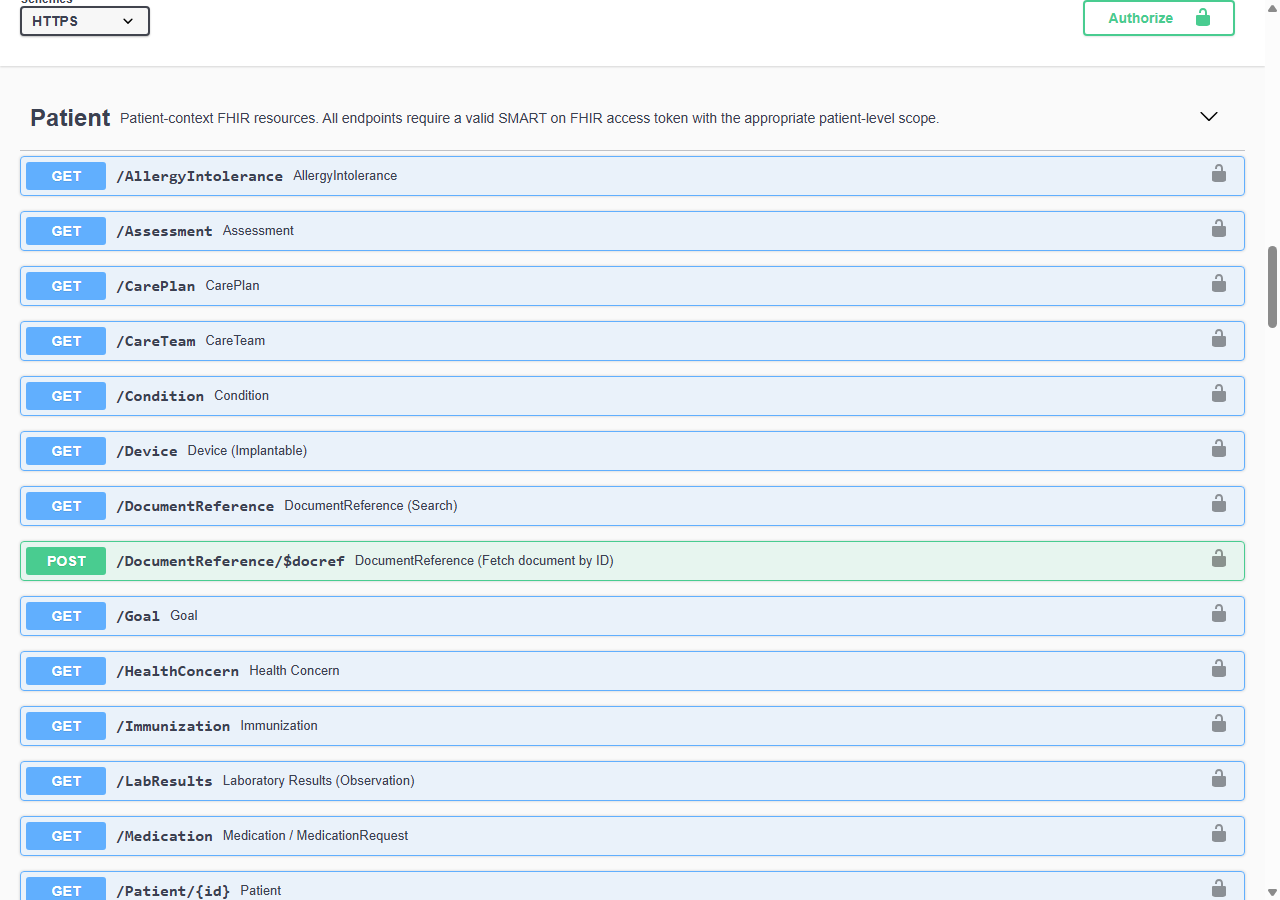
Navigate to the Swagger URL. Locate and click the Authorize button (lock icon) at the top of the page.
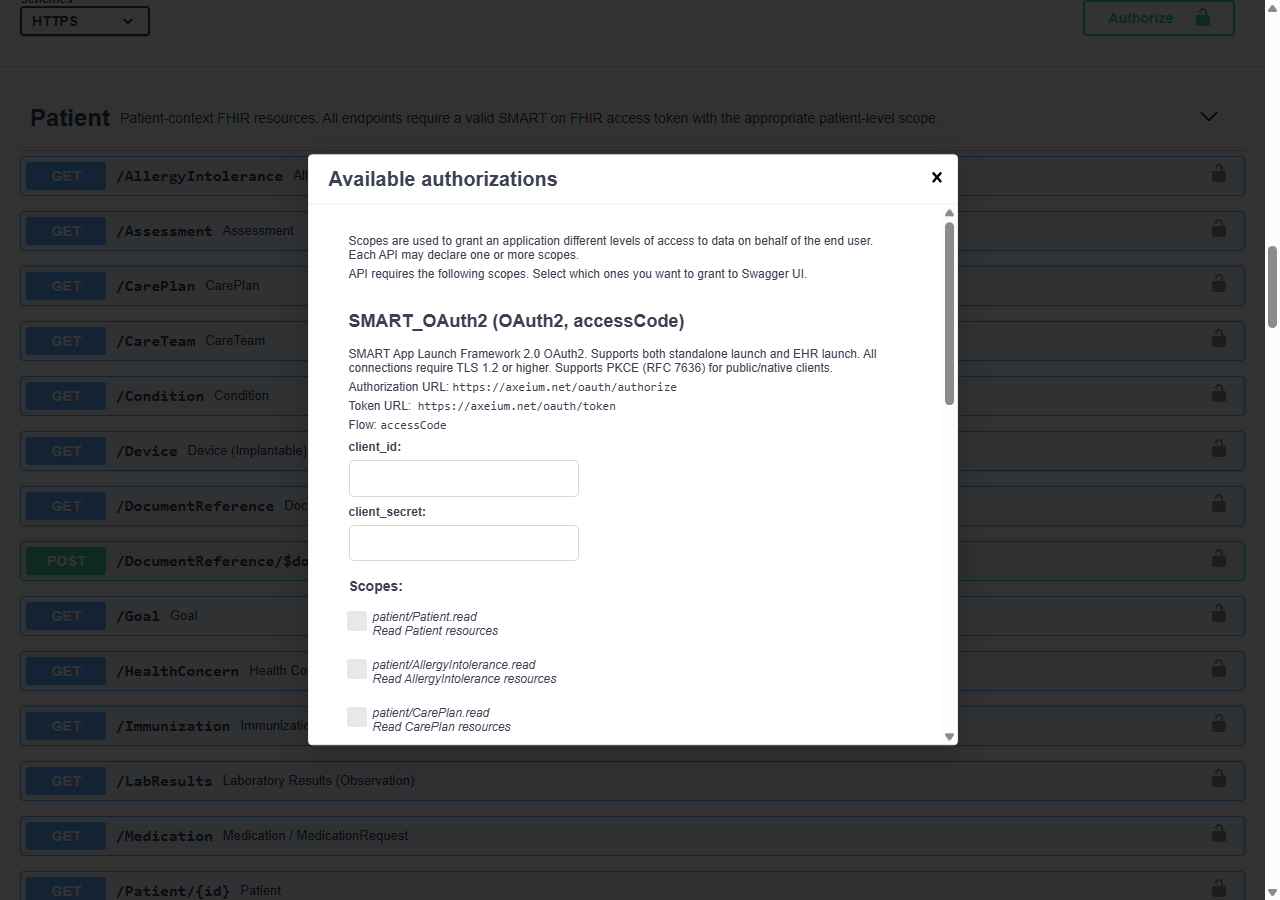
In the authorization dialog, enter external in the client_id field. Leave client_secret empty. Click Authorize.
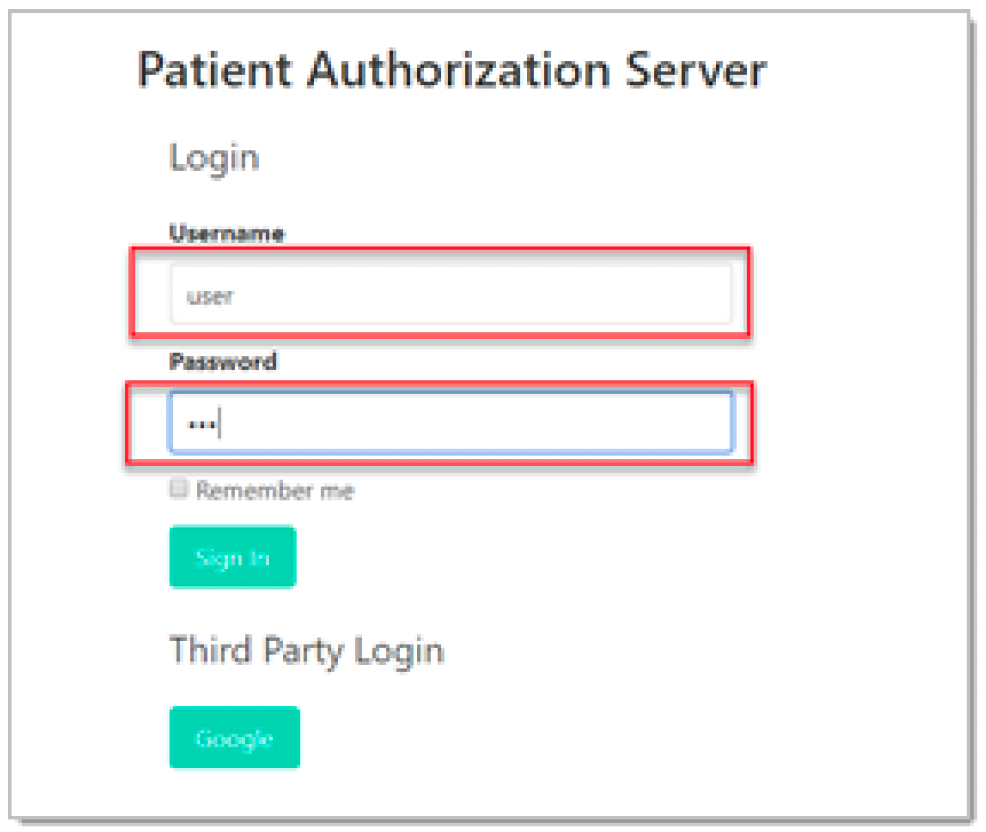
You will be redirected to the login page. Enter your username and password, then click Sign In.
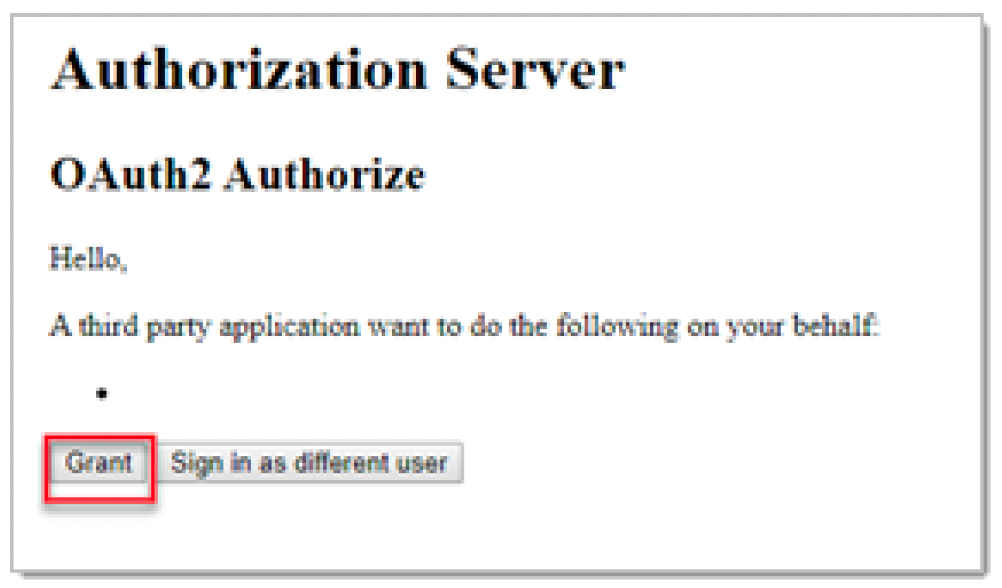
After successful authentication, click Grant to allow the application to create an access token on your behalf.
You will see a confirmation that access has been granted. Click Close to return to the Swagger interface. You are now authenticated.
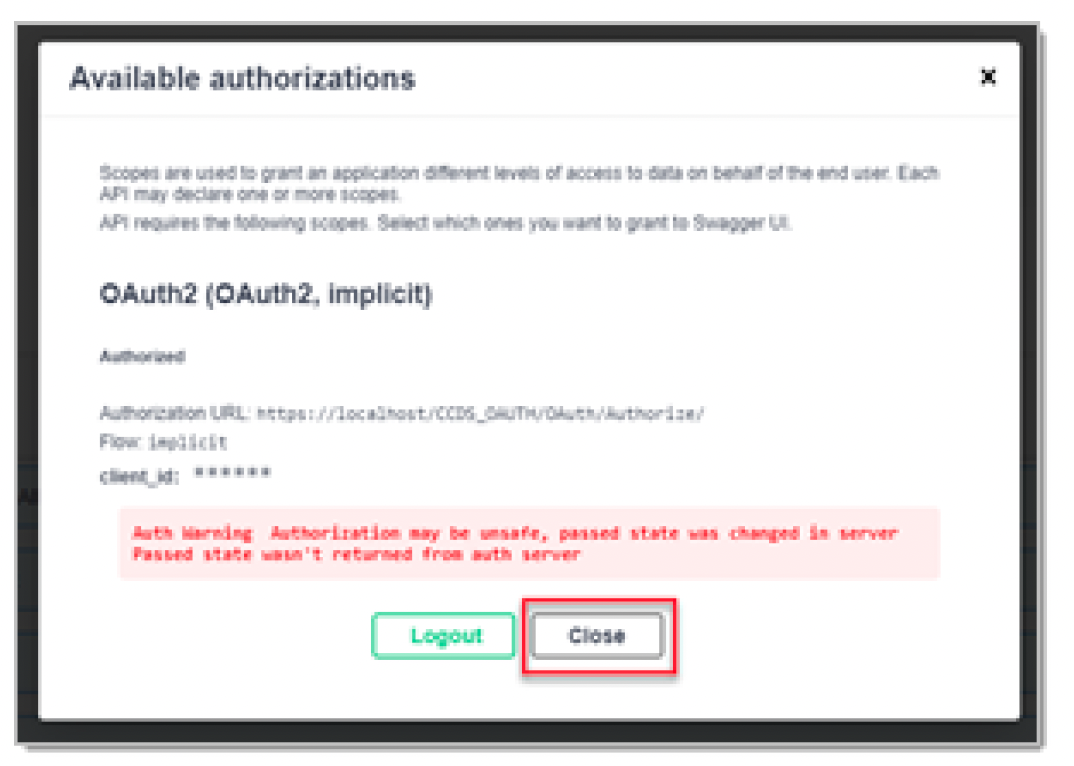
Using API Methods (Example)
Once authenticated, you can explore and test available endpoints:
Expand a GET method from the list (e.g., /Patient). Click Try it out.
Fill in the required parameters (e.g., patient ID). The parameters vary depending on the endpoint.
Click Execute. The response will appear below with the status code and response body.
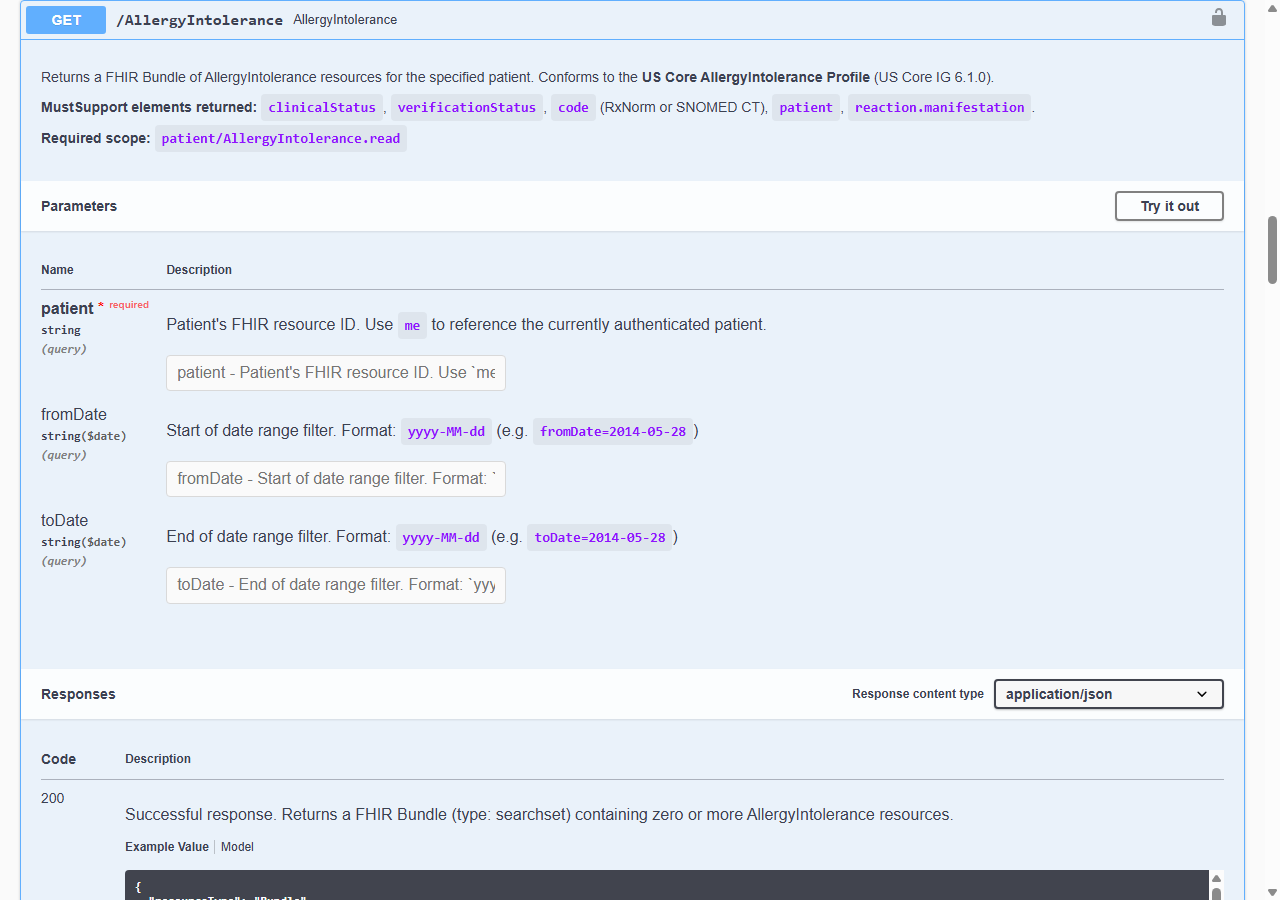
Document Return Protocol
The AXEIUM API supports clinical document exchange using the following protocol:
- GET DocumentReference — Retrieve document references using the US Core DocumentReference operation (
$docref). Returns FHIR JSON references to available documents. - POST DocumentReference — Submit clinical documents in C-CDA (Consolidated Clinical Document Architecture) XML format.
Available Methods
| HTTP Method | Format | Description |
|---|---|---|
GET | JSON / FHIR R4 | Retrieve patient data, clinical records, and document references |
POST | C-CDA XML | Submit clinical documents (Consolidated CDA) |
Conforms to US Core Patient Profile. Supports JSON and XML. Compliant with FHIR R4 v4.0.1.
| USCore Data Element | FHIR Resource Data |
|---|---|
| First Name / Middle Name | Patient.name.given |
| Last Name | Patient.name.family |
| Previous Name | Patient.name |
| Suffix | Patient.name.suffix |
| US Core Birth Sex Extension | Patient.extension.BirthSex |
| Date of Birth | Patient.birthDate |
| US Core Race Extension | Patient.extension.race |
| US Core Ethnicity Extension | Patient.extension.ethnicity |
| Preferred Language | Patient.communication |
| Address | Patient.address |
| Phone Number | Patient.telecom |
Retrieve a single Patient resource by ID.
me for the currently authenticated patient.Search patients by name.
yyyy-MM-ddmale | female | other | unknownConforms to US Core Encounter Profile. MustSupport elements: status, class, type, subject, participant, period, reasonCode, diagnosis.
me.yyyy-MM-ddyyyy-MM-dd{
"issuer": "https://apifhir.axeium.net:8443/reference-server",
"authorization_endpoint": "https://apifhir.axeium.net:8443/reference-server/connect/authorize",
"token_endpoint": "https://apifhir.axeium.net:8443/reference-server/connect/token",
"userinfo_endpoint": "https://apifhir.axeium.net:8443/reference-server/connect/userinfo",
"jwks_uri": "https://apifhir.axeium.net:8443/reference-server/.well-known/openid-configuration/jwks",
"code_challenge_methods_supported": ["plain", "S256"],
"grant_types_supported": ["authorization_code","client_credentials","refresh_token"],
"response_types_supported": ["code","id_token","code id_token"]
}
{
  "authorization_endpoint": "https://apifhir.axeium.net:8443/reference-server/connect/authorize",
  "token_endpoint": "https://apifhir.axeium.net:8443/reference-server/connect/token",
  "capabilities": [
    "launch-ehr", "launch-standalone",
    "client-public", "client-confidential-symmetric",
    "sso-openid-connect",
    "context-ehr-patient", "context-standalone-patient",
    "permission-offline", "permission-patient", "permission-user"
  ]
}
{
  "resourceType": "Patient",
  "id": "example-patient-123",
  "meta": {
    "profile": ["http://hl7.org/fhir/us/core/StructureDefinition/us-core-patient"]
  },
  "extension": [{
    "url": "http://hl7.org/fhir/us/core/StructureDefinition/us-core-race",
    "valueCoding": { "system": "urn:oid:2.16.840.1.113883.6.238", "code": "2106-3", "display": "White" }
  }],
  "identifier": [{ "value": "MRN-00001" }],
  "name": [{ "family": "Chalmers", "given": ["Peter"] }],
  "gender": "male",
  "birthDate": "1974-12-25",
  "address": [{ "city": "PleasantVille", "state": "Vic", "postalCode": "3999" }]
}
var client = new HttpClient();
var request = new HttpRequestMessage(
  HttpMethod.Get,
  "{{BaseURL}}/Patient/me"
);
request.Headers.Authorization =
  new AuthenticationHeaderValue("Bearer", token);

var response = await client.SendAsync(request);
response.EnsureSuccessStatusCode();
Console.WriteLine(
  await response.Content.ReadAsStringAsync()
);
const response = await fetch(
  `${baseURL}/Patient/me`,
  {
    headers: {
      'Authorization': `Bearer ${token}`,
      'Accept': 'application/fhir+json'
    }
  }
);
const data = await response.json();
console.log(data);
{
  "resourceType": "Bundle",
  "type": "searchset",
  "total": 1,
  "entry": [{
    "resource": {
      "resourceType": "Observation",
      "status": "final",
      "category": [{"coding":[{
        "system": "http://terminology.hl7.org/CodeSystem/observation-category",
        "code": "vital-signs"
      }]}],
      "code": {"coding":[{
        "system": "http://loinc.org",
        "code": "55284-4",
        "display": "Blood pressure"
      }]},
      "subject": {"reference": "Patient/example-123"},
      "effectiveDateTime": "2024-03-01T10:00:00Z",
      "component": [
        {
          "code": {"coding":[{"system":"http://loinc.org","code":"8480-6","display":"Systolic BP"}]},
          "valueQuantity": {"value":120,"unit":"mmHg","system":"http://unitsofmeasure.org","code":"mm[Hg]"}
        },
        {
          "code": {"coding":[{"system":"http://loinc.org","code":"8462-4","display":"Diastolic BP"}]},
          "valueQuantity": {"value":80,"unit":"mmHg","system":"http://unitsofmeasure.org","code":"mm[Hg]"}
        }
      ]
    }
  }]
}